

The Best Model for the Job
The only man who behaves sensibly is my tailor; he takes my measurements anew every time he sees me, while all the rest go on with their old measurements and expect me to fit them. — George Bernard Shaw
AI models are no different. The "best" one depends entirely on the job.
See for yourself. Pick the image that best captures each prompt:
“an asian man wearing traditional oktoberfest lederhosen and a checkered shirt smiles brightly in the style of a korean cartoon. his eyes sparkle with joy as he holds a large pretzel in one hand and a beer stein in the other. the background is filled with festive decorations, including colorful banners and balloons.”1/4
There is no best model. There's only the best model for your task, your data, and your constraints.
Each model has a distinctive character. One leans photorealistic, another favors stylization, a third nails composition but fumbles text. The best model for each prompt might be different, and "best" depends on what you're building.
And that's just images from text prompts. For video, 3D, audio, robotics, it only gets harder.
Benchmarks aren't enough
The model that tops the leaderboard on MMLU might rank fourth on your specific task. The image generator that wins on FID scores might produce exactly the wrong aesthetic for your brand. And when the top five models are within 2% of each other on a benchmark, the deciding factor might not be capability at all. It could be cost, latency, privacy, or whether the provider will silently update the model next month.
Benchmarks used to be a useful signal. They're increasingly not. Models are now optimized specifically to score well on popular benchmarks, the same way students prep for standardized tests. Scores go up, real-world performance stays uneven. When every model announcement leads with "SOTA on [benchmark]," the benchmarks have become a marketing channel, not an evaluation tool.
Like Shaw's tailor, you need to take your own measurements — on your data, for your task — and take them anew every time the landscape changes.
Evaluate on your terms
So what do you do? Run every model on your data and compare the results. Not once, but whenever your options or requirements change.
There are hundreds of models available today across text, image, video, audio, and 3D. Comparing them manually doesn't scale — different APIs, different output formats, different data systems. Mixtrain gives you a unified interface across all your models so you can run any model through the same API in workflows. That means you can compute summary metrics on your dataset — FID, CLIP score, FVD, WER, BLEU/ROUGE, trajectory smoothness — whatever you need for your use case.
But summary scores alone aren't enough. You also need to see the outputs. Mixtrain lets you compare models visually, side by side, across images, videos, and more:
from mixtrain import Model, Dataset, Eval

# Load your test data
test_data = Dataset("test-prompts").to_pandas()

# Run multiple models on the same inputs
results = Model.batch(
    models=["flux-pro-kontext", "nano-banana-pro-edit", "z-image-turbo"],
    inputs=test_data["prompt"],
).to_pandas()

# store the results dataset
results_dataset = Dataset.from_pandas(results).save("model-comparison")

# One line to create a side-by-side eval
eval = Eval.from_dataset("model-comparison")
This creates a visual eval comparing Flux, Nano Banana, and Z-Image on your test prompts. Since inputs, outputs, metrics, and human ratings all live in versioned datasets, you can query everything in one place and re-run whenever a new model drops, your test data or requirements change.
Model routing
Eval tells you which model wins on your test data. The next step is real traffic. In practice, most AI systems won't run on a single model. They'll run on many, each suited to different inputs or constraints.
A router gives you a single endpoint for your product integration. Your app calls one API, and the routing engine decides which model handles each request based on rules you configure. Swap models, adjust strategies, roll out changes, all without touching your application code.
Routing strategies include A/B testing to split traffic and measure which model performs better on real inputs, input-based routing to send different request types to different models, fallbacks when a model fails or times out, and shadow testing to run a new model alongside production without affecting users. Here's a customer running 13 models who tested and cut over one of them to a new model over a few weeks:
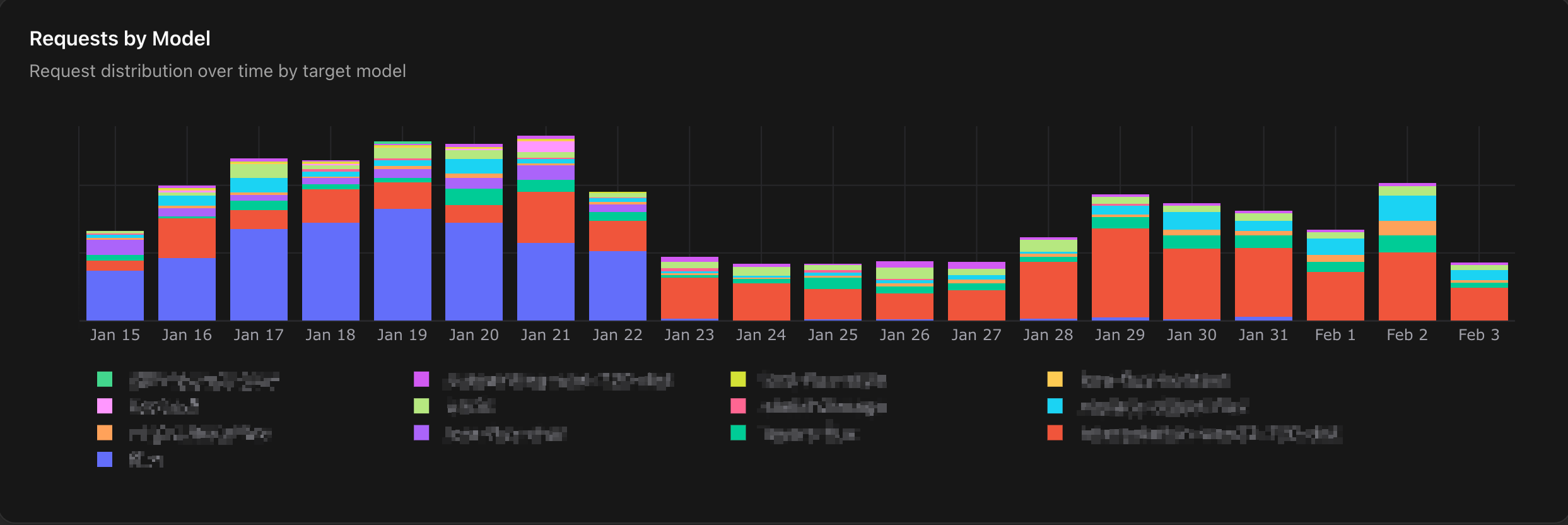
Every request is fully traceable: which model was selected, the full input/output, and you can jump into the Playground to try alternatives. And since routing rules are versioned, you can trace when a decision changed and roll back instantly.
When off-the-shelf isn't enough
Sometimes the best model for the job doesn't exist yet, and you need to build a specialized model for your task. Your eval reveals the signals:
Capability gap — the model consistently fails on the same types of inputs, prompting has plateaued, or the top models are all close in quality but a specialized model could deliver the same results at 10–100x lower cost.
Constraints — your data has compliance requirements, you need more control over model changes, or you need deployment flexibility across on-prem and edge.
Data moat — you have proprietary data that would make a specialized model a durable competitive advantage.
And you already have the foundation to train. Your eval tells you which base model to start from and where the gaps are. Once trained, you can compare your custom model against existing options using the same eval, and your router deploys it safely: shadow test, A/B test, gradual rollout. We'll cover how in our next post, from data curation to training to deployment.
There is no single best model. But there is a right one for your task, whether you find it or train it. Get started with Mixtrain to shorten your time to the best model for the job.
Thanks for reading!